Retrieve Login ID Account
BDWINGO uses mobile phone numbers as
login accounts. If you fill in the wrong mobile phone number to register, please submit
it here!
Q : How do I submit a question about Retrive Login ID Account at the
BDWINGO Self-Service Center ?
A : If you forgot your login number you filled in when registering, you
need to submit on the customer service self-service center and submit all requirement to
"Retrieve Login ID Account" and follow the step by step below :
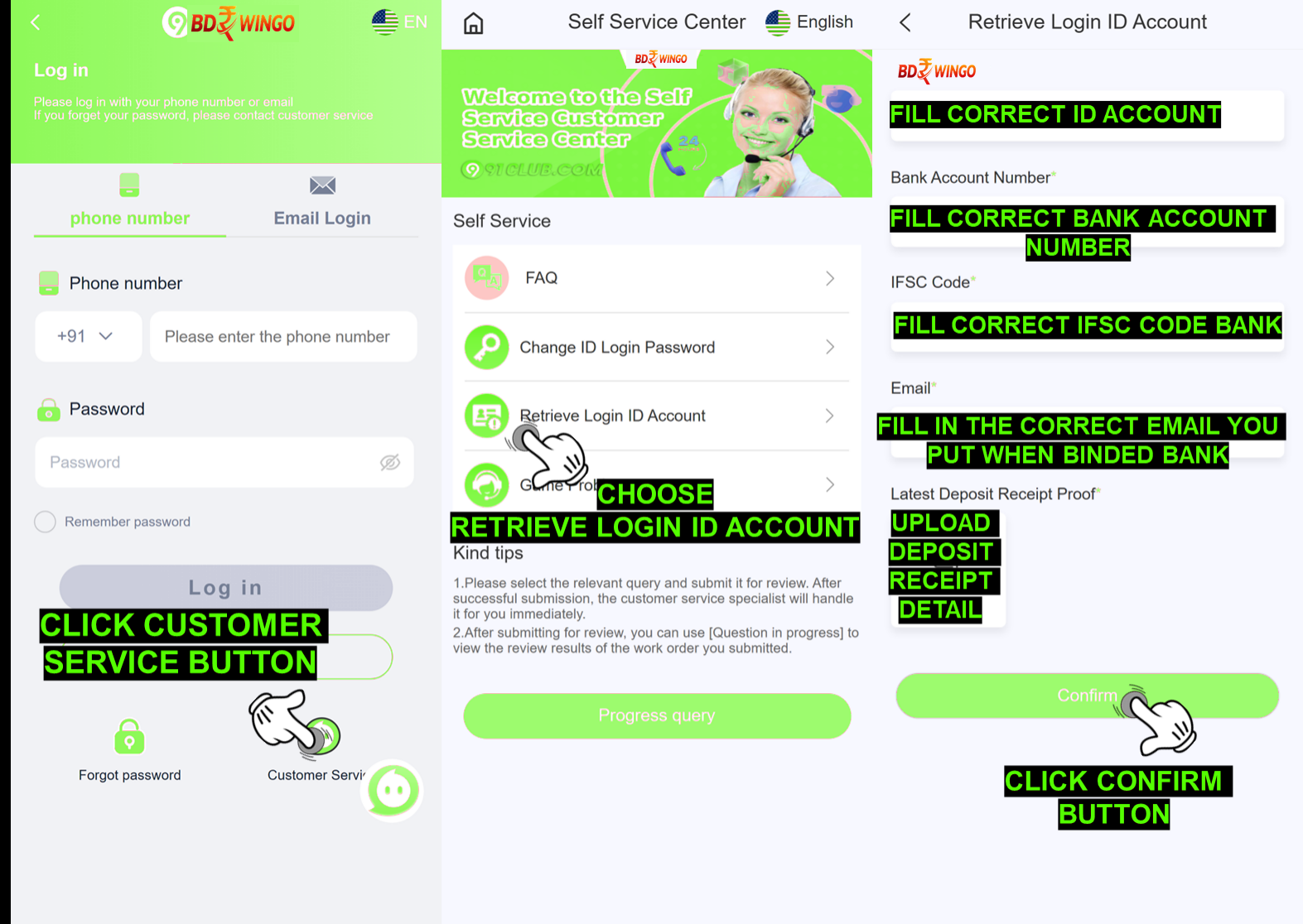
After Login
Visit our BDWINGO official link at: https://www.BDWINGO.com/
Click Customer Service button
Choose Retrieve Login ID Account
Fill in the correct ID Account
Fill in the correct IFSC bank code
Fill in the correct Bank Account Number
Fill in the correct and active email address that you use while bound your bank
Upload the latest deposit receipt that you made in your ID account
Click the "Confirm" button
STATUS
ISSUE
Q : How do i check my status issue Retrieve Login ID
Account on self-service center BDWINGO ?
A: You can check the status of your problem by clicking to
view the problem status, filling in your mobile phone number account,
selecting the problem of retrieving the login ID account, and finally
clicking Search and entering the mobile phone number you entered during the
query.
SUCCESS
STATUS
Q : I already checking and the status in here already success and there is a
notes Success "We success retrieved your account data, your
account log in ID is xxxx with the phone number xxxx""
what is that mean ?
A: BDWINGO account department already success retrieve the
BDWINGO account data and give the ID account also the phone number for login
you just need to try login using the phone number provided.
Notes: There is sometimes our account department will inform you
using 9191 that mean you register wrong phone number because 91 country
code already added from the start that mean you should try login using
91xxxx.
REJECT
STATUS
Q : What about with status reject i need to know if my Retrieve
Login ID Account issue get reject by BDWINGO account
department?
A: Okay rest assured we will help to explain to you there
is few possibility that make your account got rejection and we will give
explanation on this below :
Reject "Please resubmit requirement detail and clear":
This mean all data requirement provide blur or cannot be see clear,
please resubmit all back with clear and detail again.
Reject "Your application has rejected" : This mean
BDWINGO account department is reject the request there might be a
problem on that account of the requirement you provide incorrect.
Reject "Your requirement still on verification" : This
mean you need wait patiently because our BDWINGO account department
still processing to retrieve your account back.